Profile & content
All modules explained
Every module on your profilo page at a glance – what it shows, the fields it has and which ones are Premium.
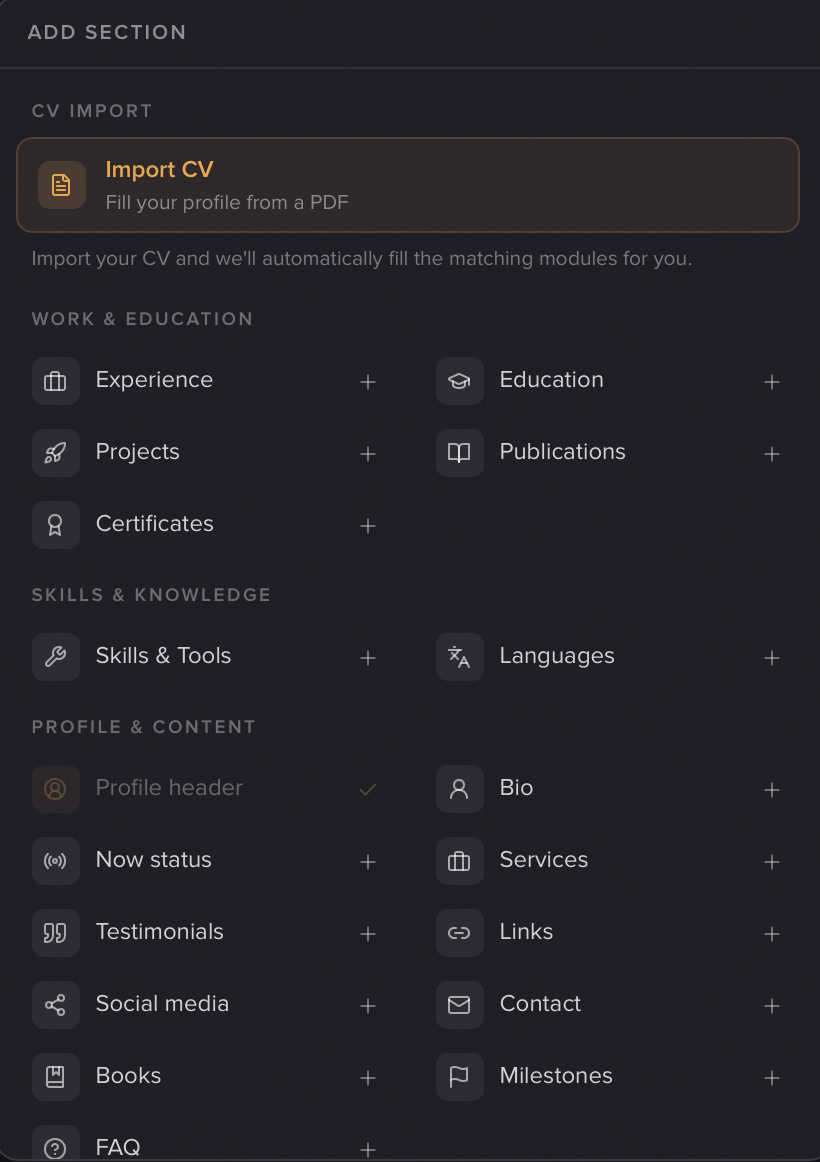
Your profilo page is made of modules – small building blocks you arrange freely in the grid. Hinzufügen (Add) in the editor opens the picker: four categories (Beruf & Ausbildung / Work & education, Fähigkeiten & Kenntnisse / Skills & knowledge, Profil & Inhalte / Profile & content, Individuell / Custom), plus the Lebenslauf-Import (CV import) at the very top.
This page is the full reference: every module, what it shows, the key fields and whether it's Premium.
Note: During the current test phase, all Premium modules are unlocked for everyone – the (Premium) tag just shows where they'll belong later.
For how to add, fill and arrange modules, see Build your profile.
Good to know
A few things apply to many modules:
- Unique vs. repeatable. Most modules exist only once per tab – once added, they show a checkmark and appear greyed out in the picker. Only these can be added multiple times: Textfeld (Text field), Bild (Image), Galerie (Gallery), Embed, Trenner (Divider), Leerer Bereich (Empty space) and Kleiner Abstand (Small spacer).
- Empty modules are invisible. As long as you haven't entered anything, a module won't appear on your public page – the editor flags it with "Noch leer, erscheint so noch nicht auf deiner Seite" (Still empty, not showing on your page yet).
- Collapse long lists. On list modules (Experience, Education, Projects, Publications, Certificates, Books, Milestones, Languages) you can turn on Lange Liste einklappen (Collapse long list) at the top: only the first entries show, the rest appears via Aufklappen (Expand) or a Pop-up. Many detail fields too (CV roles, bullet points, logos, dates) can be collapsed while editing to keep the form tidy.
Beruf & Ausbildung (Work & education)
Your professional story – these modules are also filled automatically by CV import.
- Erfahrung / Experience (Free) — Your work history as a timeline. Each entry is one company (with logo) and one or more positions. Per position: role, Zeitraum (period, month/year, bis heute / until today checkbox), Ort (location) and Stichpunkte (bullet points). Up to 12 entries, auto-sorted by date.
- Ausbildung / Education (Free) — Like Experience, but for school and university: degree & field, period, location, bullet points, logo. Up to 12 entries.
- Projekte / Projects (Free) — A showcase for your work. Each entry: project name (+ logo), period, link, an image (16:9, ~1200×675 recommended) and a description. Up to 16 entries.
- Publikationen / Publications (Premium) — Articles, papers, posts. Each entry: title, "published in", date, link, description. Up to 16 entries.
- Zertifikate / Certificates (Premium) — Courses & certifications. Each entry: certificate/course (+ logo), issuer, date, credential ID, proof link and competencies. Up to 24 entries.
Fähigkeiten & Kenntnisse (Skills & knowledge)
- Skills & Tools (Free) — Your skills and tools as tags. Type + Enter or comma adds a skill; optionally grouped into up to 8 named categories (e.g. Technical, Soft skills). Up to 60 skills in total.
- Sprachen / Languages (Free) — Languages with a proficiency level. Each language gets a Niveau (level: Basic, Good, Fluent, Business-fluent, Native). Up to 20.
Profil & Inhalte (Profile & content)
The building blocks about you.
- Profil-Header / Profile header (Free) — The centerpiece at the top: photo, name, a short bio and an optional location. Added automatically as the first tile – one per tab.
- Bio (Free) — A few sentences about you, with light formatting (bold, italic, underline, small heading, lists). Up to 600 characters.
- Now-Status / Now status (Premium) — A small "what are you working on right now?" tile with an optional date (e.g. "June 2026"). Perfect for a 1×1 tile.
- Services (Free) — What you offer, as a list. Each service has a title and an optional short description. Up to 8.
- Links (Free) — Your most important links, each a label + URL. Up to 10.
- Social Media / Social media (Free) — Your social profiles: fixed fields for LinkedIn, X / Twitter, Instagram, GitHub, YouTube, TikTok and Website. Empty fields stay hidden.
- Kontakt / Contact (Free) — A contact button. Fields: headline, email address and button text.
- Bücher / Books (Premium) — Book recommendations. Each book: title, author, link and a "why recommended" note. Up to 24.
- Meilensteine / Milestones (Premium) — Your goals/journey with a progress bar. Each entry: title, achieved/planned toggle, optional month/year and a short description. The order is the journey. Up to 12.
- FAQ (Premium) — Up to 5 question/answer pairs, shown accordion-style on your page.
Individuell (Custom)
Free-form blocks for anything else – these modules can be added multiple times.
- Textfeld / Text field (Premium) — A free block with its own heading (up to 60 characters) and formatted text (up to 1000 characters).
- Bild / Image (Premium) — A single image. Upload as JPG/PNG/WebP/GIF/HEIC, plus the Ausfüllen / Einpassen (Fill / Fit) toggle. More in Images & uploads.
- Galerie / Gallery (Premium) — Several square images as a carousel, up to 12. See Images & uploads.
- Embed (Premium) — Embed external content by link: YouTube, Spotify, Loom, Figma and Calendly. Paste the link, wait for "✓ … erkannt" (detected), done. Details in Embeds.
- Leerer Bereich / Empty space (Free) — An empty tile as a placeholder in the grid. No editor – you just resize it as you like.
- Kleiner Abstand / Small spacer (Free) — Invisible vertical spacing on the public page. No editor, freely adjustable in height.
Trenner (Divider)
- Trenner / Divider (Premium) — A visual divider line between two rows, as Nur Linie (line only) or Linie mit Text (line with a short label, e.g. "Projects").
Note: You won't find the divider in the add list. Hover over the gap between two rows in the grid and click Trenner einfügen (Insert divider).
For all Premium modules and everything else Premium unlocks, see Premium & billing.
Related articles
Build your profile: add, arrange & fill modules
How to add modules, fill them with content and arrange your profile page with drag & drop — the complete editor workflow.
Embeds: YouTube, Spotify, Loom, Figma & Calendly
Embed YouTube, Spotify, Loom, Figma or Calendly directly in your profilo – paste a link, done.
Images, avatar & uploads
Crop your profile photo, add images & galleries, upload logos — plus the allowed formats, sizes and limits.