Profile & content
Images, avatar & uploads
Crop your profile photo, add images & galleries, upload logos — plus the allowed formats, sizes and limits.
Photos bring your page to life — from your profile picture to project covers and a small gallery. Here you'll learn where you can upload images, which formats are allowed and how many images your account holds.
Profile photo (avatar)
Your profile photo sits at the top in the Profil-Header. Here's how to swap it:
- Open the editor and click Bearbeiten on the header.
- At the top of the window, click Foto hochladen (or drag an image straight onto the circle).
- The Foto zuschneiden (crop) dialog opens: drag the image to position it and use the zoom slider (1×–3×) or your scroll wheel to choose the crop.
- Confirm with Übernehmen — you'll briefly see "Lädt hoch…", then the photo is set.
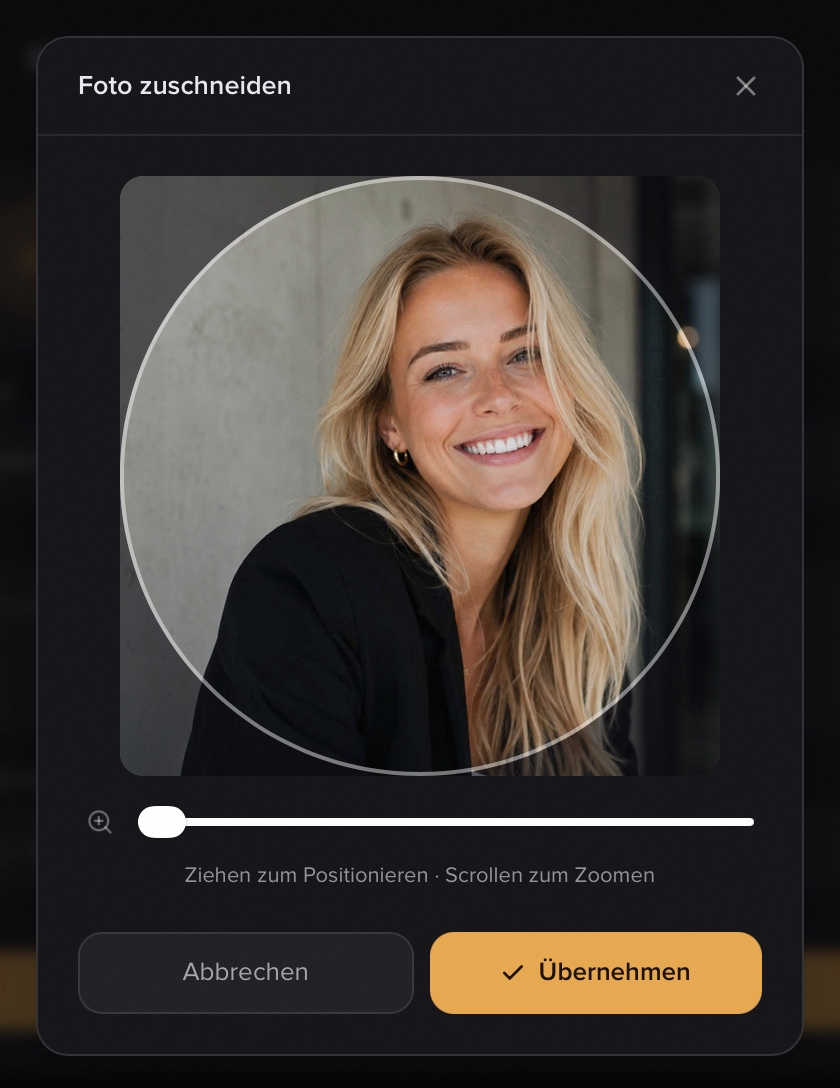
Note: The profile photo is cropped to a square. A clear portrait with a little space around the head works best. Want to remove it? In the header editor, click the trash icon or Entfernen — the change takes effect when you Speichern and Veröffentlichen.
Image module
For a single image anywhere in the grid, add the Bild module via Hinzufügen → Individuell → Bild. In the editor you upload the image and pick how it sits inside the tile frame under Darstellung:
- Ausfüllen (Fill) — the image fills the whole tile (edges may be cropped).
- Einpassen (Fit) — the entire image is visible, with a little margin around it.
You can add several image modules.
Gallery
To show multiple images, use Hinzufügen → Individuell → Galerie. The Galerie holds up to 12 images and displays them on your page as a swipeable carousel. Just fill the next empty slot.
Logos in projects & résumé
The career modules let you upload images too — as logos. Under Erfahrung (experience) and Ausbildung (education) each company or school gets a logo, and under Projekte (projects) you can add a logo plus a cover Bild. More on these modules in All modules.
Tip: A landscape image at roughly 16:9 (e.g. 1200 × 675 px) looks cleanest as a project cover.
Formats, size & limits
- Allowed formats: JPG, PNG, WebP, GIF and HEIC/HEIF. iPhone photos in HEIC format are converted automatically — you don't need to convert anything beforehand.
- Maximum file size: 10 MB per file. Larger files are rejected.
- Image limit per account: 15 images total on Free, 100 on Premium. The limit applies to all your images combined — profile photo, logos and module images share the same pool.
- Replacing an existing image doesn't use a new slot — only genuinely new images count toward the limit.
Note: Premium is regularly €8/month (or €79/year — 2 months free). During the current trial phase Premium is unlocked for everyone at no cost, with no payment method required. So for now you have room for 100 images.
Privacy
Every uploaded image is automatically optimised to WebP (logos stay PNG so transparency is preserved). In the process, EXIF and GPS data are stripped — so telltale location or camera info never ends up on your public page.
Tip: External content like YouTube videos or Spotify players aren't images but embeds of their own — see Embeds for how that works.
Related articles
All modules explained
Every module on your profilo page at a glance – what it shows, the fields it has and which ones are Premium.
Build your profile: add, arrange & fill modules
How to add modules, fill them with content and arrange your profile page with drag & drop — the complete editor workflow.
Embeds: YouTube, Spotify, Loom, Figma & Calendly
Embed YouTube, Spotify, Loom, Figma or Calendly directly in your profilo – paste a link, done.